Masonry LogoMasonry Logo
Home
Pricing
Log inGet started
  1. Home/
  2. AI Models/
  3. FLUX Kontext Max
Black Forest Labs

FLUX Kontext Max

Black Forest Labs' FLUX Kontext Max edits an existing image from a plain instruction, or generates a new one from text, in nine aspect ratios with PNG or JPG output.

⌘↵ to create
Try
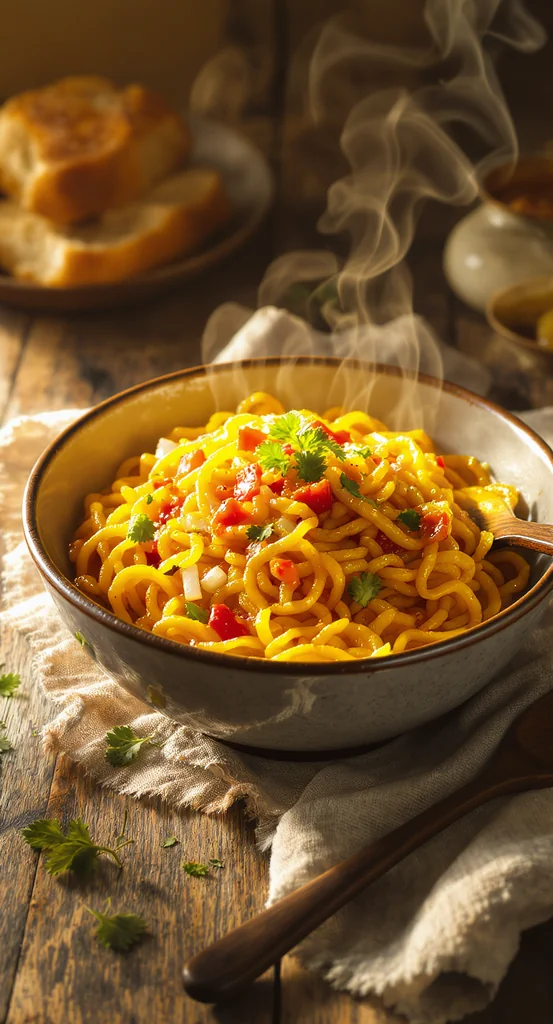
A steaming bowl of freshly prepared Maggi noodles with curly, golden-yellow strands glistening under warm ambient light.
Remix
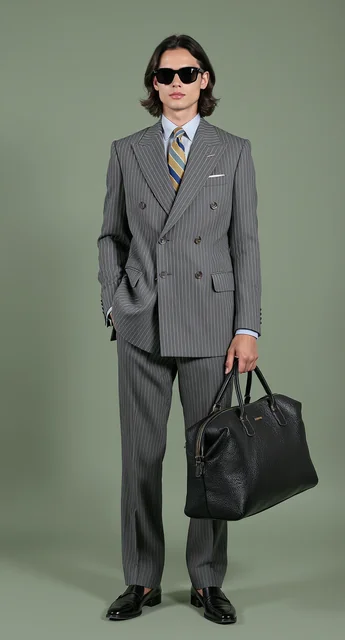
a stylish person posing confidently against a muted green studio backdrop. They are dressed in a sharp, tailored gray pi
Remix
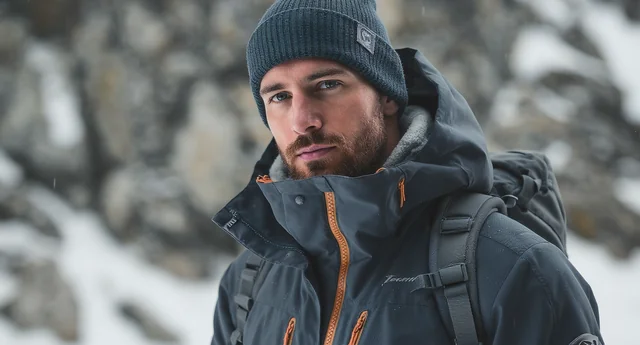
a man outdoors in a cold, mountainous environment, dressed in technical winter gear. He is wearing a dark gray waterproo
Remix
1 per edit

Input images

9, from 21:9 to 9:21

Aspect ratios

PNG, JPG

Formats

Black Forest Labs

Developer

Overview

About FLUX Kontext Max

FLUX Kontext Max is Black Forest Labs' instruction-based image model. Its main job is editing: give it one image and say what should change, such as "make the background a sunlit kitchen" or "change the jacket to navy", and it returns a new version that keeps the rest of the picture. Without an input image it works as a text-to-image model.

In Masonry, Kontext Max accepts one input image per edit and outputs PNG or JPG in nine aspect ratios, from square to wide 21:9 and tall 9:21. Exact pixel sizes are snapped to the nearest supported ratio. You can set a seed for repeatable results, adjust guidance (lower values look more realistic), turn on automatic prompt enhancement, and set a safety tolerance from 1 to 6, which is capped at 2 when you edit an image.

Use it when you already have an approved image and need a specific change without rebuilding the whole scene. For edits that combine several reference images, choose a model that accepts more inputs, such as FLUX 3 Image or Seedream 5 Pro.

Real prompts

Prompts behind these FLUX Kontext Max images

Actual prompts from FLUX Kontext Max renders by the Masonry community. Copy any prompt, then remix it into your own creation.
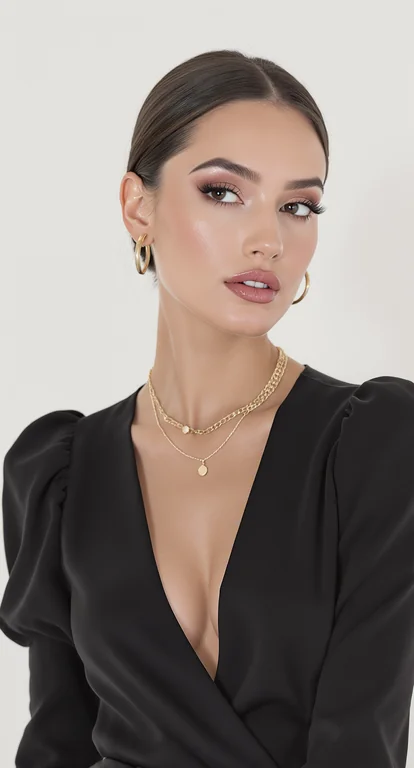
a woman posing against a plain light background, styled in an elegant and minimal fashion. She is wearing a black, deep
a woman posing against a plain light background, styled in an elegant and minimal fashion. She is wearing a black, deep V-neck top with slightly puffed shoulders, giving her outfit a sophisticated silhouette. Her dark, straight hair is parted in the middle and tucked neatly behind her ears, complementing her polished appearance. The main focus is on her accessories with layered gold necklaces featuring small pendants and hoops earrings that match in tone. Her makeup is natural and refined, emphasising a smooth complexion, neutral lips, and well-groomed brows. The lighting is soft and even, highlighting her features with a gentle glow. The overall mood is poised, confident, and modern — fitting for a beauty, fashion, or jewellery editorial portrait.
Remix
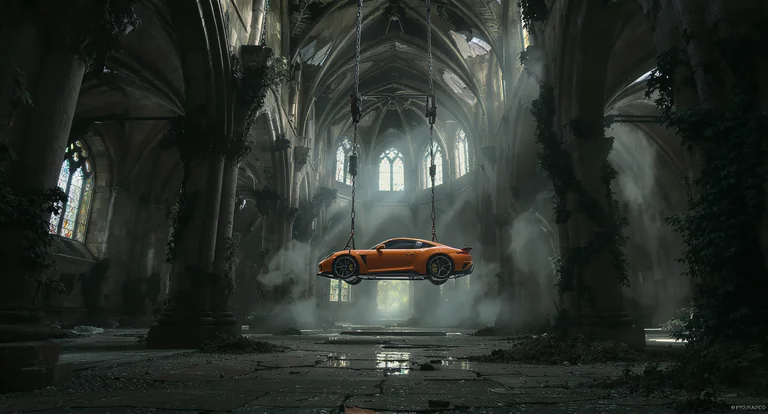
A surreal cinematic scene set inside a vast, abandoned gothic cathedral with towering stone arches, cracked walls, and t
A surreal cinematic scene set inside a vast, abandoned gothic cathedral with towering stone arches, cracked walls, and tall stained-glass windows diffusing cold, misty daylight. Suspended in mid-air at the center of the nave is a bright orange sports car, lifted by heavy chains and a metal hoist frame attached to the vaulted ceiling. The car hangs perfectly horizontal, emphasizing tension and impossibility. Moss, vines, and creeping vegetation reclaim the ancient stone interior, while puddles on the cracked stone floor reflect the cathedral’s architecture and the floating vehicle above. The contrast between the modern, glossy supercar and the decaying medieval environment creates a striking visual juxtaposition. Lighting is soft but dramatic, with volumetric light rays cutting through dust and fog, evoking a mood of mystery, surrealism, and post-apocalyptic elegance. Highly detailed, cinematic realism with a dark, contemplative atmosphere.
Remix
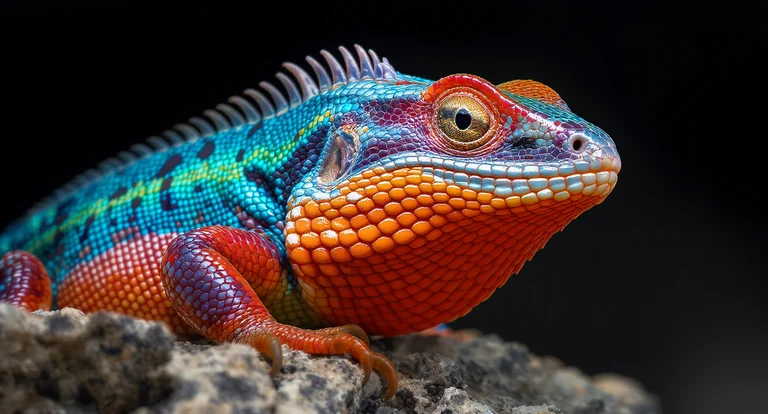
A striking close-up portrait of a vividly colored lizard perched on a textured rock, captured at eye level with shallow
A striking close-up portrait of a vividly colored lizard perched on a textured rock, captured at eye level with shallow depth of field. The reptile features an extraordinary gradient of saturated hues—electric blue scales along the body, fiery orange and red tones on the head and limbs, and subtle purple transitions across the neck and torso. Fine scale textures are sharply detailed, with glossy highlights catching the light. One large, reflective eye is in crisp focus, conveying alertness and curiosity. The background fades into a dark, softly blurred gradient, isolating the subject and enhancing contrast. Lighting is dramatic yet controlled, emphasizing color vibrancy and surface detail. The overall mood is bold, exotic, and visually arresting, ideal for wildlife art, fantasy realism, or high-end digital illustration.
Remix
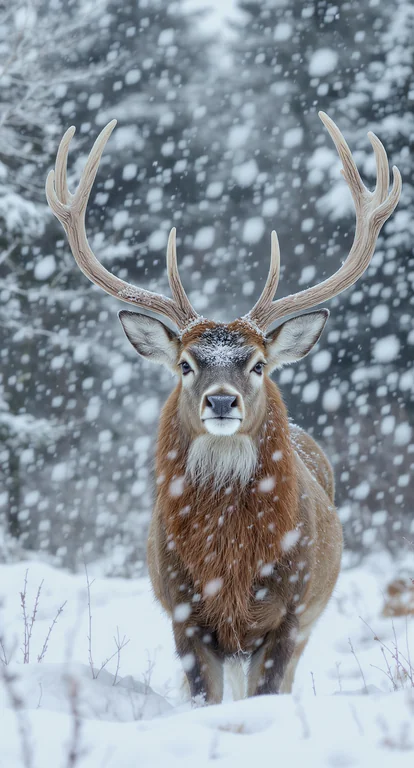
A close-up wildlife portrait of a majestic stag standing still in a snowy forest during active snowfall. The deer faces
A close-up wildlife portrait of a majestic stag standing still in a snowy forest during active snowfall. The deer faces the camera directly, with large symmetrical antlers coated in fresh snow, creating a striking and powerful composition. Its fur is a rich warm brown, lightly dusted with snowflakes, contrasting against the soft white foreground and cool gray-blue background. The background features blurred winter trees with shallow depth of field, producing a dreamy, atmospheric bokeh effect. Lighting is soft and diffused, typical of overcast winter conditions, emphasizing fine details in the fur, antlers, and snow texture. The mood is calm, serene, and slightly dramatic, evoking wilderness, nature, and seasonal beauty. Shot at eye level with a centered composition, high realism, no text, ideal for commercial wildlife, winter, or holiday-themed stock imagery.
Remix
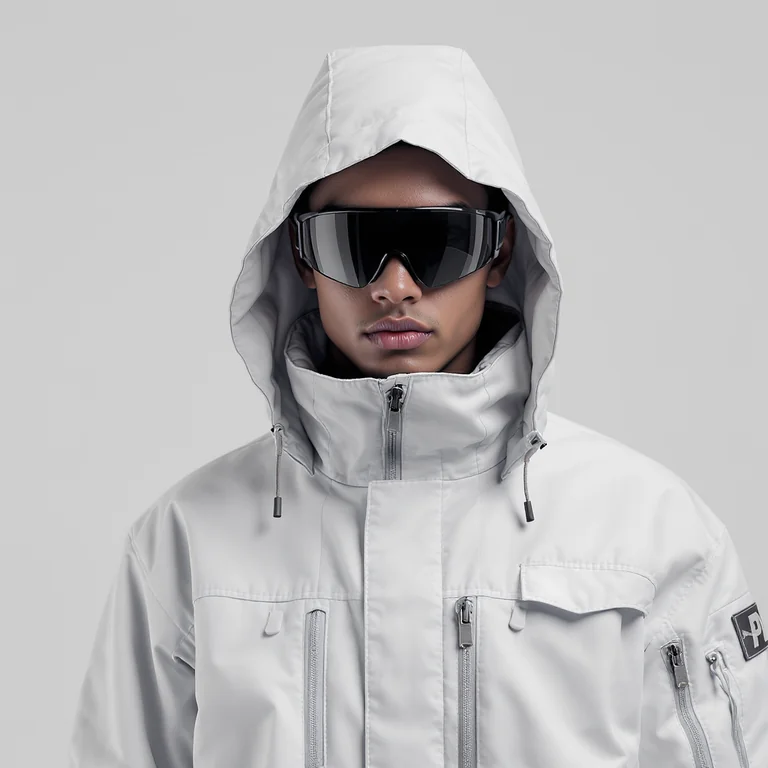
a person wearing a futuristic, minimalist outfit. They are dressed in a light gray or off-white high-collared jacket mad
a person wearing a futuristic, minimalist outfit. They are dressed in a light gray or off-white high-collared jacket made of smooth, water-resistant material, featuring multiple zippers, pockets, and technical detailing. The jacket’s hood is pulled up, covering much of the head and framing the face symmetrically. The person is also wearing large, reflective black visor-style sunglasses, giving a high-tech, sci-fi, or avant-garde fashion aesthetic. The background is a clean, neutral gray-white, emphasizing the sleek design and monochrome palette of the outfit. The overall look is modern, stylish, and futuristic, blending elements of performance wear, fashion editorial, and sci-fi costume design — a perfect visual for a high-end techwear or minimalist fashion campaign.
fashion
Remix
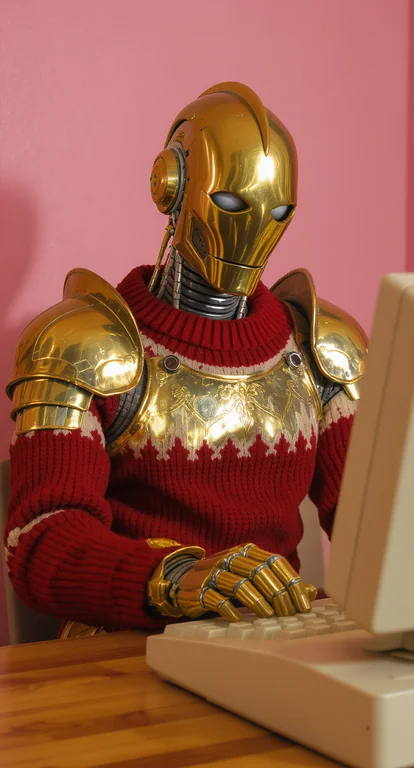
This image shows a stylized humanoid robot with a golden metallic head, neck, and hands, dressed in a quirky combination
This image shows a stylized humanoid robot with a golden metallic head, neck, and hands, dressed in a quirky combination of ornate gold armor plating and a knitted sweater in red and white. The robot is posed in front of a vintage beige computer, with its hands placed on the keyboard as if typing. The robot’s design mixes retro-futuristic and medieval elements: its golden body parts resemble old-fashioned robotics, while the armor-like plating on its shoulders and chest evokes a knightly aesthetic. The knitted sweater adds a humorous, almost domestic contrast to the otherwise mechanical and regal look. The background is a simple pink wall, which, along with the warm lighting, gives the scene a playful, staged, and slightly surreal vibe. The overall mood is whimsical, ironic, and imaginative, blending themes of technology, fashion, and retro nostalgia in a visually striking way.
cartooncgi
Remix
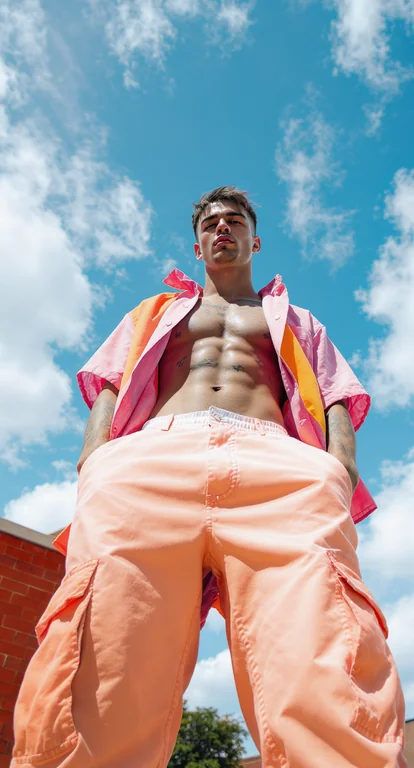
Dynamic low-angle fashion portrait of a confident young man standing outdoors under a bright blue sky with scattered clo
Dynamic low-angle fashion portrait of a confident young man standing outdoors under a bright blue sky with scattered clouds. He wears pastel peach cargo pants paired with an open short-sleeve shirt in shades of pink and orange, revealing his toned torso and tattoos. The upward perspective emphasizes power and presence, while the vibrant colors contrast dramatically with the sky, creating a bold, modern editorial look. Perfect for streetwear campaigns, youth fashion branding, and contemporary lifestyle imagery.
fashionhuman
Remix
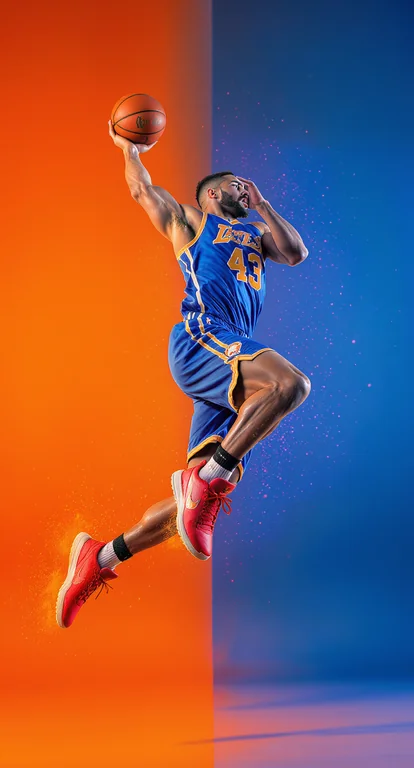
Dramatic action shot of a basketball player in mid-air performing a powerful jump, wearing a blue jersey with the number
Dramatic action shot of a basketball player in mid-air performing a powerful jump, wearing a blue jersey with the number 43 and bright red sneakers. The athlete is captured in motion against a vibrant gradient background of orange and blue, creating a bold and energetic contrast. Muscular physique highlighted with sharp studio lighting, emphasizing movement, strength, and athleticism. Modern sports photography with a stylized, high-impact editorial look, perfect for fitness campaigns, motivational posters, or athletic brand advertising.
athletehuman
Remix
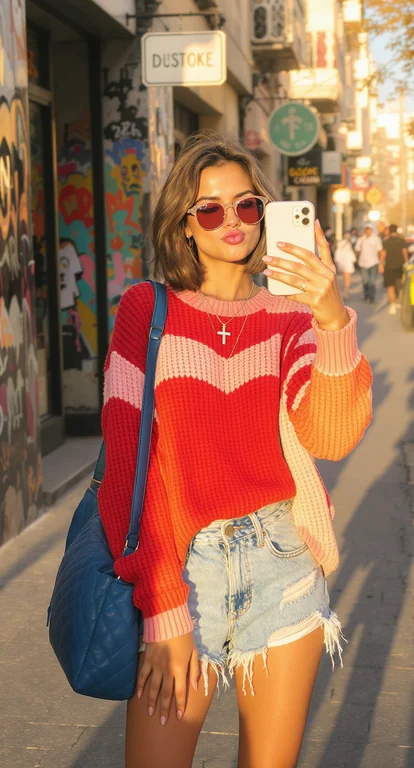
A trendy young woman takes a casual street-style selfie on a sunny day. She has short, wavy brown hair and wears round r
A trendy young woman takes a casual street-style selfie on a sunny day. She has short, wavy brown hair and wears round rose-tinted sunglasses, puckering her lips playfully. She is dressed in a loose red-and-pink knit sweater layered over a white top, distressed denim shorts, and sporty sneakers. A large quilted blue shoulder bag hangs on her side, and she wears layered necklaces, including a cross pendant. The background shows an urban street with storefronts, graffiti art, parked cars, and pedestrians, all bathed in warm golden sunlight with long shadows. The style is photorealistic, modern, and urban with a relaxed, youthful vibe.
humanphotorealistic
Remix
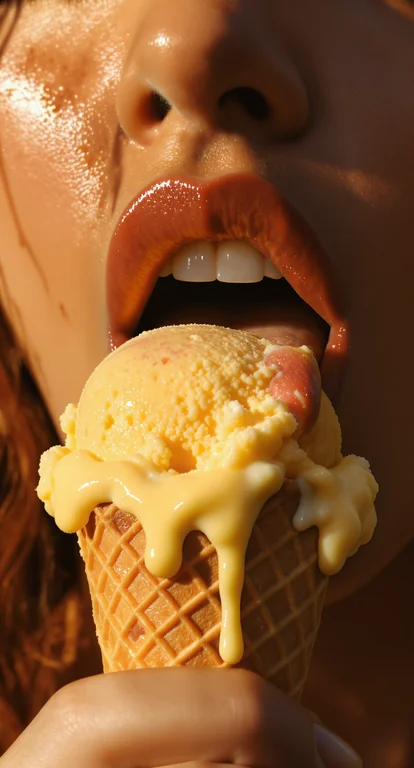
A sensual, artistic close-up photograph of a person licking a melting ice cream cone. The focus is on the mouth and hand
A sensual, artistic close-up photograph of a person licking a melting ice cream cone. The focus is on the mouth and hand, with glossy lips slightly parted, tongue extended toward the ice cream. The ice cream is bright golden yellow, dripping over the edges of a textured waffle cone. The skin has a smooth, natural tone with warm highlights and soft shadows. Lighting is dramatic and sunlit, creating a cinematic, vintage-inspired aesthetic. The style is editorial, photorealistic, and bold.
foodhuman
Remix
Browse the full gallery

Why teams choose FLUX Kontext Max

Choose FLUX Kontext Max when you have one image you like and need a targeted change described in words. It keeps the edit narrow, so the rest of the frame stays put. If the job needs several reference images at once, or output above its aspect-ratio presets, use FLUX 3 Image or Seedream 5 Pro instead, and always check product labels and logos after an edit.

Capabilities

What FLUX Kontext Max can do

The capabilities that set FLUX Kontext Max apart and earn its place in a brief

Edit with a Plain Instruction

Describe the change in words and keep the rest of the image, with no masks or layers to prepare.

Text-to-Image Too

Without an input image, Kontext Max generates a new image from your prompt, so one model covers both jobs.

Nine Aspect Ratios

Square, landscape, portrait, and wide or tall 21:9 and 9:21 frames. Exact sizes snap to the nearest supported ratio.

Repeatable with a Seed

Set a seed to reproduce an edit, then change one instruction at a time to compare results.

Guidance and Prompt Enhancement

Lower the guidance for a more natural look, or let the model expand a short instruction automatically.

Safety Tolerance Control

Set the filter from 1 (most strict) to 6. Edits of an input image are limited to 2 or stricter.

Use cases

Where teams reach for FLUX Kontext Max

  • Swapping the background behind an approved product photo
  • Changing a color, material, or prop without reshooting
  • Restyling a lifestyle image for a new season or campaign
  • Removing or adding a single object in a scene
  • Quick text-to-image drafts in wide or tall formats
  • Iterating on one image with small, repeatable edits

Explore related categories

Browse adjacent categories and creative directions teams are exploring

fashion
cartoon
cgi
human
photorealistic
athlete
selfie
food
product-photography
FAQ

Frequently asked questions

What teams need to know about creating with FLUX Kontext Max in Masonry

What is FLUX Kontext Max?

FLUX Kontext Max is Black Forest Labs' instruction-based image model. It edits an existing image from a plain description of the change, and it can also generate new images from text.

How many images can I give FLUX Kontext Max?

One input image per edit in Masonry. For edits that combine several references, use a multi-image model such as FLUX 3 Image or Seedream 5 Pro.

What sizes does FLUX Kontext Max support?

Nine aspect ratios, from wide 21:9 to tall 9:21, including square, 16:9, 9:16, 4:3, 3:4, 3:2, and 2:3. Exact pixel sizes are snapped to the nearest supported ratio.

Will an edit change parts of the image I did not mention?

It aims to keep everything you do not mention, but small changes can still appear. Say what must stay the same in your instruction, and compare the result with the original at full size, especially labels and logos.

How much does FLUX Kontext Max cost in Masonry?

Masonry bills each image in credits and shows the exact cost before you generate.

Can I use FLUX Kontext Max from the command line?

For text-to-image, yes. Install the Masonry CLI with npm install -g @masonryai/cli, sign in with masonry login, then run masonry image with your prompt and --model flux-kontext-max. For editing an existing image, use the Masonry canvas, and check masonry models params flux-kontext-max for the options the CLI currently exposes.

How does my team use FLUX Kontext Max in Masonry?

Open a Masonry canvas, pick FLUX Kontext Max from the model selector, and describe the image you need: a product shot, an ad creative, a social post. Masonry generates it, then you refine, edit, and combine FLUX Kontext Max with other models in one workspace.

Is FLUX Kontext Max free to try?

New Masonry accounts get 50 free credits to try GPT Image 2.5 Flare. FLUX Kontext Max is included in every paid plan, and the editor shows the exact credit cost before you generate.

How do I write good prompts for FLUX Kontext Max?

Write the edit as one clear instruction and name what must stay the same, for example "change the wall to deep green, keep the chair, lighting, and framing". Make one change per run and set a seed so you can compare. See the prompt gallery on this page for real FLUX Kontext Max prompts you can copy and adapt.

Who makes FLUX Kontext Max?

FLUX Kontext Max is built by Black Forest Labs. Inside Masonry it runs alongside 50+ image and video models, so your team can pick the right one for each brief without switching tools.

Can I see examples made with FLUX Kontext Max?

Yes, the prompt gallery on this page shows real images teams have generated with FLUX Kontext Max in Masonry, each paired with the exact prompt you can copy and adapt for your own brand.

Start creating with FLUX Kontext Max

Generate, edit, and compare across 50+ models in one workspace.

Create with FLUX Kontext Max

Guides for FLUX Kontext Max

Prompt walkthroughs and examples from the Masonry blog

How to Prompt AI Image Models: 6 Rules and Model NotesGPT Image 2 vs FLUX.2 (2026): GPT for Text and Edits, FLUX for Speed and Cost

Explore more AI models

Compare FLUX Kontext Max with other models teams run in Masonry

FLUX 1.1 ProBlack Forest Labs · ImageFLUX 3 ImageBlack Forest Labs · ImageFLUX.2 DevBlack Forest Labs · ImageFLUX.2 FlexBlack Forest Labs · ImageFLUX.2 Klein 4B BaseBlack Forest Labs · ImageFLUX.2 Klein 9B BaseBlack Forest Labs · Image
Masonry LogoMasonry Logo

Collaborate on campaigns, remix prompts, and ship visuals with the best AI models

Get startedLog in

Get the app

Download Masonry AI: Photo & Video on the App StoreDownload Masonry AI: Photo & Video on the App Store

Product

  • Overview
  • AI Canvas
  • Models
  • CLI
  • Pricing

AI tools

  • Interior Design
  • Landscape Design
  • Home Exterior
  • Infographic Generator
  • Kitchen Design
  • All AI tools

Explore

  • Gallery
  • Prompts
  • AI Video Agency
  • Nano Banana Pro
  • Nano Banana 2.1
  • Blog
  • FAQ

Company

  • Support
  • Contact
  • Twitter
  • LinkedIn
TermsPrivacy
© 2026 Masonry AI Inc