

- 1 image
Required source
- 5 or 10 seconds
Clip duration
- 480p · 720p · 1080p
Resolution
- Not exposed
Public CLI audio input
About WAN 2.5 (Image-to-Video)
WAN 2.5 image-to-video turns one source image and a motion prompt into a five- or ten-second clip. The current Masonry route exposes 480p, 720p, and 1080p output; a negative prompt; and a seed. That makes it useful for bounded still-to-motion jobs such as a slow product push-in, a light sweep, or restrained atmosphere around a campaign image. It is not a product-fidelity guarantee. Generated frames still need to be compared with the approved SKU before the clip reaches a product page, ad, marketplace feed, or customer email.
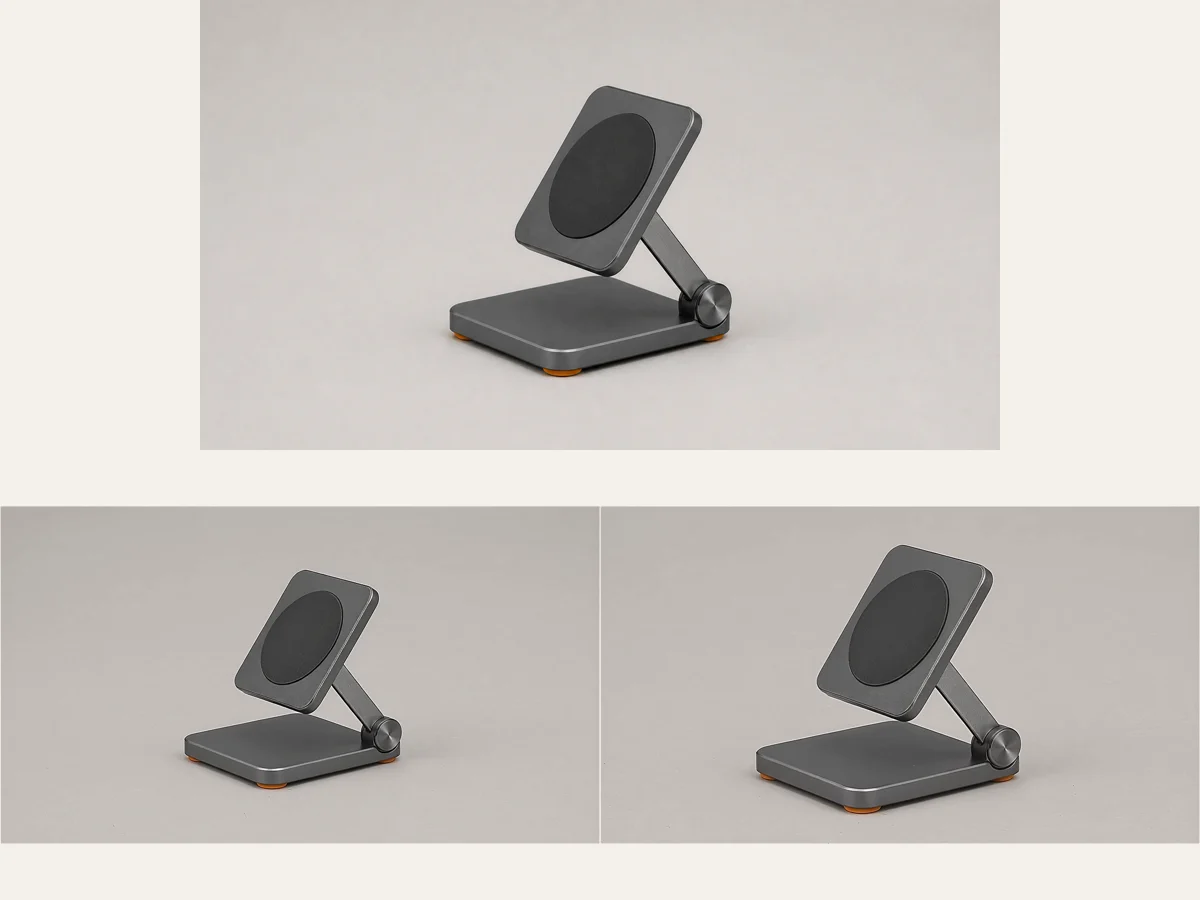
This page documents the route merchants can use in Masonry today, rather than repeating every capability in the underlying provider API. In particular, the public Masonry CLI parameter view does not expose audio upload or lip-sync for this model. The practical workflow is therefore source image → one motion instruction → low-risk draft → sampled-frame review → deterministic captions and offer copy. We ran that workflow once on a fictional graphite folding stand at 1280×720 for five seconds. The stand kept its pad, circular inset, support arm, hinge, base, and visible feet through five one-second samples, but the camera push-in was much stronger than the requested four percent. That result is evidence for a useful draft workflow, not a repeatability rate or proof of exact product preservation.
Why teams choose WAN 2.5 (Image-to-Video)
Choose WAN 2.5 image-to-video when the starting asset already contains the composition and product truth you need, and the remaining job is a short, bounded motion draft. It is a better fit than text-to-video when inventing the product would create commercial risk. Models with first-and-last-frame controls are better candidates when a documented mechanical transition must land on an exact endpoint; conventional video or verified 3D is safer when the motion itself proves how a product works. The route's 5/10-second and 480p/720p/1080p choices make it straightforward to test, but the useful business metric is cost per accepted channel-ready clip—not raw generations.
What WAN 2.5 (Image-to-Video) can do
The capabilities that set WAN 2.5 (Image-to-Video) apart and earn its place in a brief
One Approved Image as the Starting Frame
The route requires one source image. For merchant work, use the exact approved SKU, color, configuration, crop, and background that the final channel should show; do not ask the model to invent a product state that the source record does not support.
Five- or Ten-Second Clips
Masonry accepts a duration of 5 or 10 seconds for this endpoint. Five seconds is the lower-cost review unit for checking motion and product drift; choose ten only when the placement and storyboard genuinely need the additional time.
480p, 720p, or 1080p Output
The current route maps 854×480, 1280×720, and 1920×1080 to the provider's 480p, 720p, and 1080p resolution choices. Draft at 720p when identity review matters, then rerun at the delivery resolution after the motion brief passes.
Prompt and Negative-Prompt Control
Describe one camera move or one visible motion, then name failure modes such as morphing, duplicated parts, new props, text, cuts, and background changes in the negative prompt. A constraint is a review criterion, not a guarantee that the model will obey it.
Seeded Comparisons
A seed can be supplied with the same source, prompt, duration, and dimension. Record it for review and debugging, but do not describe a seed as deterministic product reproduction; model and provider behavior can still change.
A Merchant Acceptance Gate
Sample the returned clip across time and compare silhouette, part count, labels, materials, color, configuration, and allowed motion against the source. Release only the channel-ready output that passes; route an illustrative failure to concepts, not to the PDP.
Where teams reach for WAN 2.5 (Image-to-Video)
- PDP secondary-media draftAdd restrained motion to an approved product still, then inspect temporal identity before testing it as optional gallery media. The generated clip illustrates the approved product; it does not establish mechanics, fit, safety, or performance.
- Paid-social product revealCreate a short push-in or light sweep for a product-led ad while leaving headline, price, promotion, legal copy, and CTA to a deterministic editor.
- Campaign key visual in motionExtend a composed hero image into a short feed or presentation clip without redesigning the entire scene.
- Email and landing-page loopGenerate a restrained motion draft, export an approved poster or short loop, and test the actual page-weight and reduced-motion experience before release.
- Marketplace video candidatePrepare a clean motion master for a marketplace workflow, then validate the destination's current duration, resolution, format, rights, and product-mapping requirements separately.
- Motion-direction test before productionCompare push-in, parallax, and light-sweep directions on an approved still before allocating a larger video budget or production day.
- Product-family creative explorationUse separately approved source images for each color or variant; never imply that one generated clip represents every sold option.
- Catalog-to-video triageRun a small set of commercially important SKUs through the same acceptance rubric and scale only the motion pattern that produces usable outputs at an acceptable cost per approved clip.
What sets WAN 2.5 (Image-to-Video) apart
The strengths teams reach for, shown on real renders.
Source, First Frame, and Final Frame
This retained review board shows the approved source beside the opening and closing frames from one real five-second 720p Masonry job. The product structure remained recognizable, while the final crop reveals that the requested four-percent push-in was not followed closely enough for strict camera-direction acceptance.
Four Temporal Identity Checks
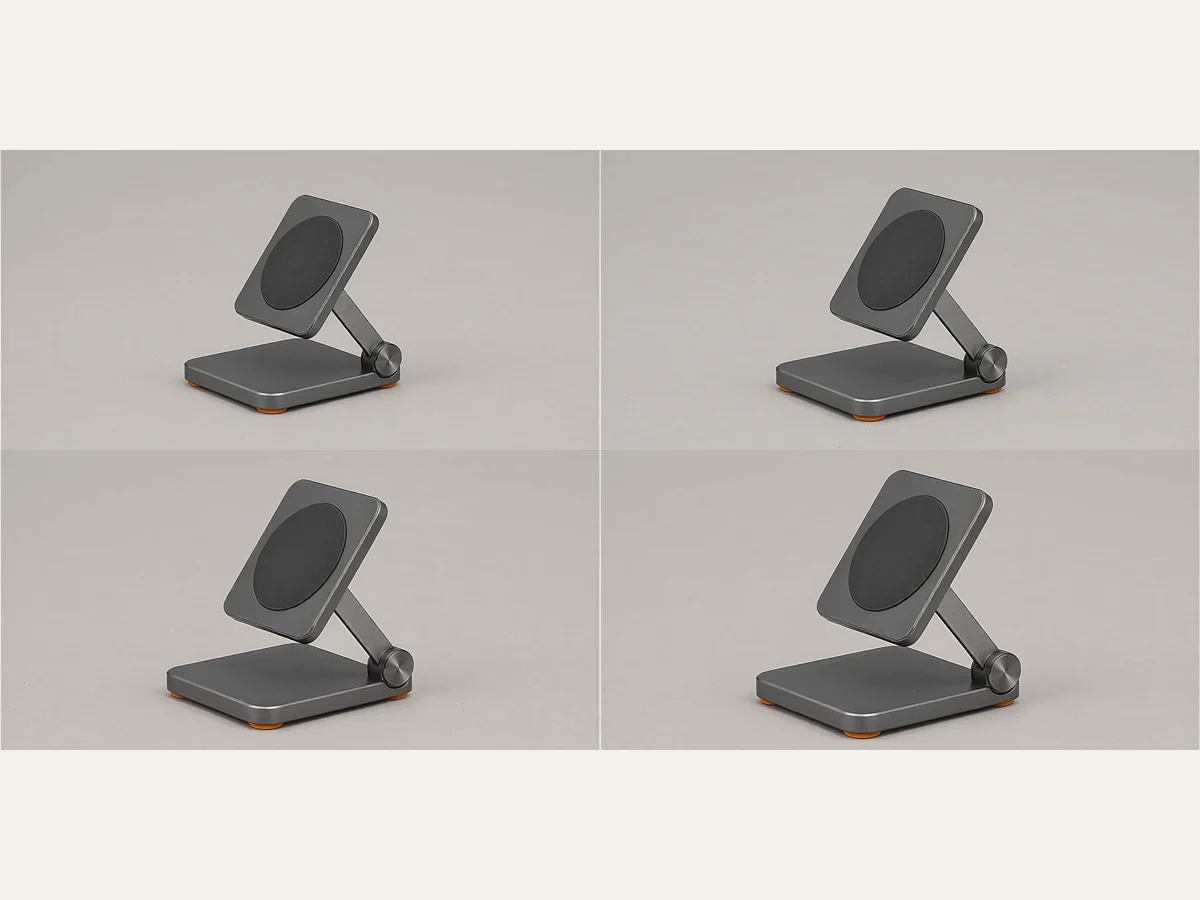
The 4:3 review board samples the opening, two intermediate points, and closing frame from the same returned clip. The pad, circular inset, support arm, hinge, base, and visible orange feet remained present without an added prop, text, cut, fold, or background replacement in these checkpoints. This is one inspected output, not a model-wide success rate.
Explore related categories
Browse adjacent categories and creative directions teams are exploring
Frequently asked questions
What teams need to know about creating with WAN 2.5 (Image-to-Video) in Masonry
What inputs does WAN 2.5 image-to-video require in Masonry?
The current Masonry route requires a text prompt, one image, and a dimension choice. It also exposes a negative prompt, seed, and the video command's duration option. The public parameter view does not expose an audio upload, lip-sync control, multiple reference images, a first/last-frame pair, or a motion brush.
How long are WAN 2.5 image-to-video clips?
The endpoint accepts five- or ten-second durations. Start with five seconds when testing a new product, motion pattern, or prompt because the first question is whether the returned frames preserve the approved asset. A longer clip creates more temporal surface area to inspect and should have a placement reason.
What resolutions does WAN 2.5 support on the current Masonry route?
Masonry exposes 854×480, 1280×720, and 1920×1080 dimensions, corresponding to 480p, 720p, and 1080p. The underlying fal endpoint documents the same three resolution tiers. Resolution does not repair geometry drift, so review identity before paying for the final tier.
Does WAN 2.5 preserve an ecommerce product exactly?
Do not assume exact preservation. In one retained Masonry test, the fictional stand's main structure remained stable across five one-second samples, but the camera pushed in substantially more than requested. Different products, prompts, seeds, and service versions can behave differently. Compare every commercially relevant frame with approved source evidence.
What did the first-hand WAN 2.5 merchant test show?
One 1280×720, five-second job used an approved 16:9 image of a fictional graphite folding stand and requested a four-percent push-in plus one light sweep. Across five sampled seconds, no new prop, text, cut, fold, or background replacement appeared, and the visible product structure remained recognizable. The stronger-than-requested zoom means the output is useful identity evidence but not a strict camera-direction pass. One output is not a success rate.
Can WAN 2.5 upload audio or perform lip-sync in the Masonry CLI?
Not through the current public CLI parameter view for this model. The underlying fal endpoint documents an optional audio URL, but Masonry's exposed WAN 2.5 inputs do not currently include it. This page therefore does not instruct Masonry users to upload audio or promise a lip-sync workflow.
Does WAN 2.5 generate native audio on this route?
The documented fal image-to-video schema describes optional supplied audio rather than a native-audio control, and Masonry does not expose that upload here. The retained test file contained an AAC track with near-silent measured levels, which should not be treated as useful generated sound. Plan narration, music, captions, and compliance review as a separate delivery step.
Which aspect ratios can merchants use with WAN 2.5?
Masonry's dimension control accepts 16:9, 1:1, and 9:16 aliases as well as the listed pixel dimensions. Compose the approved source at the placement's intended ratio and choose the matching dimension. Then verify the returned file instead of relying on an assumed follow-input rule.
Is WAN 2.5 open source or self-hostable through this page?
No self-hosting workflow or downloadable weights are exposed by this Masonry route; it calls the hosted fal image-to-video endpoint. Do not treat the WAN 2.5 API name as evidence that weights or a particular license are available. Teams that require self-hosting should evaluate a separately documented open-weight model and its license.
Can WAN 2.5 create an accurate product demo from one image?
One image can support visible surface appearance and restrained motion, but it cannot establish hidden geometry or how a mechanism operates. For a documented fold, opening, or adjustment, use approved first and last states with a route that accepts both, then inspect the intermediate frames. Record the real product or use verified 3D when the motion itself is evidence.
How should a merchant review a WAN 2.5 product clip?
Check the first frame, last frame, and regular samples between them. Compare silhouette, proportions, part count, labels, color, material, reflections, background, crop, camera behavior, and every claimed motion with the approved record. Mark each item pass, hold, or reject. Keep generated offer text and pricing out of the master so those fields remain deterministic.
Should price, CTA, and product claims go in the generation prompt?
No. Render price, promotion, SKU, CTA, captions, disclaimers, and legal copy in a deterministic editor or storefront layer after the clean motion passes. This prevents a regeneration from changing customer-facing commerce state and lets a merchant update an offer without recreating the video.
When is WAN 2.5 a poor fit for ecommerce video?
Use another method when the clip must prove a mechanism, show an unseen side accurately, preserve tiny regulated label text through aggressive motion, deliver an exact first-to-last transition, or maintain a repeatable camera path. Those jobs need stronger source coverage, first/last-frame control, verified 3D, or conventional capture.
How should WAN 2.5 product-video performance be measured?
Measure cost per accepted clip first: generation cost plus review and rework divided by outputs that pass the channel gate. After release, join eligible exposure to play behavior, selected variant, add-to-cart, checkout, completed order, fulfillment, returns, and contribution. A valid experiment is required before claiming incremental revenue; views and assisted conversions alone are directional.
How does WAN 2.5 fit the source-accurate PDP video workflow?
Use it for a bounded still-to-motion draft after the exact SKU image and allowed motion are approved. The source-accurate PDP workflow then adds temporal inspection, deterministic overlays and poster imagery, exact variant mapping, accessible playback, page-performance checks, channel validation, and completed-order measurement. WAN 2.5 is one generation step, not the whole release system.
What is WAN 2.5 (Image-to-Video)?
WAN 2.5 (Image-to-Video) is an AI video generation model from WAN Video, available inside Masonry, the AI creative agent teams use to produce marketing, product, and brand videos.
How does my team use WAN 2.5 (Image-to-Video) in Masonry?
Open a Masonry canvas, pick WAN 2.5 (Image-to-Video) from the model selector, and describe the video you need: a product shot, an ad creative, a social post. Masonry generates it, then you refine, edit, and combine WAN 2.5 (Image-to-Video) with other models in one workspace.
Is WAN 2.5 (Image-to-Video) free to try?
Yes, you can start generating videos with WAN 2.5 (Image-to-Video) on Masonry's free tier, then scale up with higher limits and priority processing as your team grows.
How do I write good prompts for WAN 2.5 (Image-to-Video)?
Use one approved product image at the intended delivery aspect. Ask for one restrained camera or lighting behavior, explicitly freeze geometry and object count, and list the expensive failure modes in the negative prompt. Start with a five-second 720p review. Sample frames across time before deciding whether a 1080p rerun is worth the cost. Add price, offer, CTA, captions, and legal copy after generation so they remain exact and editable. See the prompt gallery on this page for real WAN 2.5 (Image-to-Video) prompts you can copy and adapt.
Who makes WAN 2.5 (Image-to-Video)?
WAN 2.5 (Image-to-Video) is built by WAN Video. Inside Masonry it runs alongside 50+ image and video models, so your team can pick the right one for each brief without switching tools.
Can I see examples made with WAN 2.5 (Image-to-Video)?
Yes, the prompt gallery on this page shows real videos teams have generated with WAN 2.5 (Image-to-Video) in Masonry, each paired with the exact prompt you can copy and adapt for your own brand.
Start creating with WAN 2.5 (Image-to-Video)
Generate, edit, and compare across 50+ models in one workspace.
Guides for WAN 2.5 (Image-to-Video)
Prompt walkthroughs and examples from the Masonry blog
Explore more AI models
Compare WAN 2.5 (Image-to-Video) with other models teams run in Masonry