


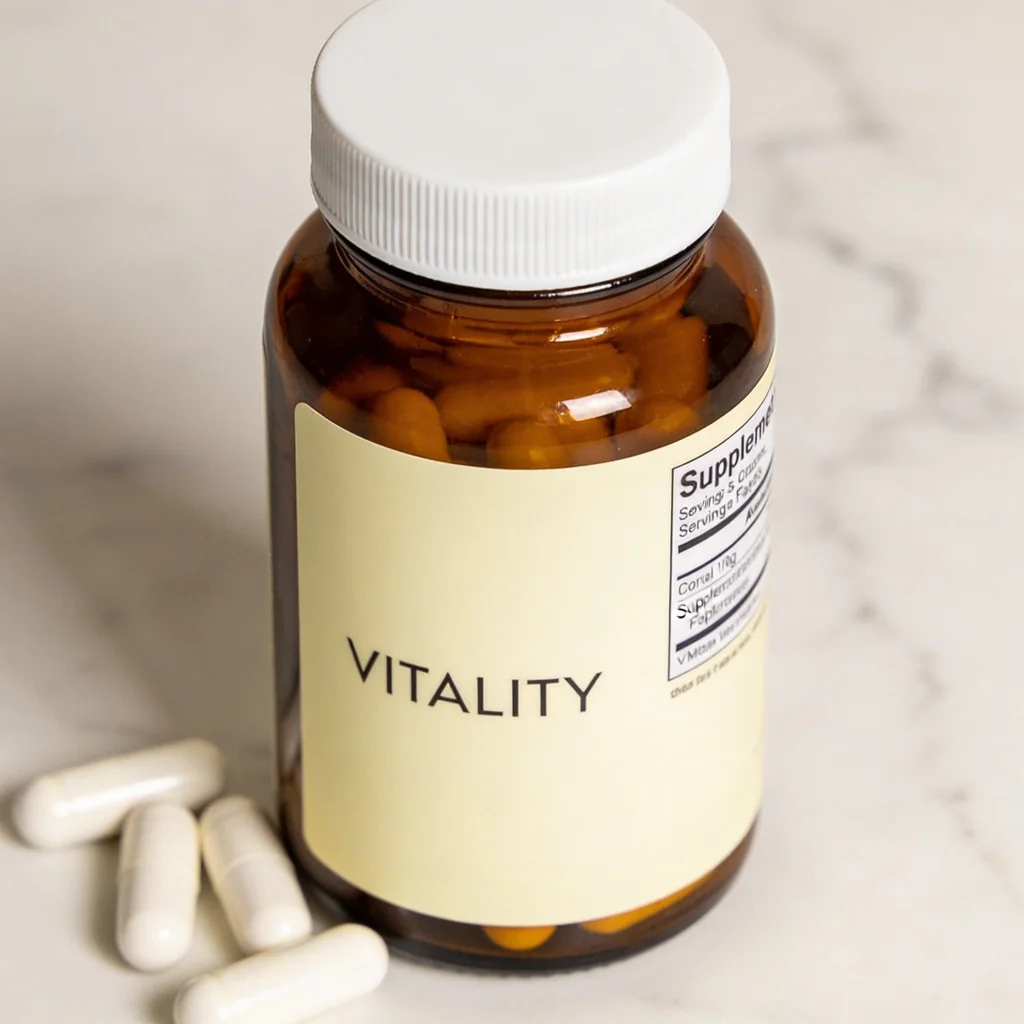
If you generate a supplement bottle from a text prompt, the model is not reading your verified formula or approved label file. In this first-hand test, three image models produced convincing product photography—and every one invented the Supplement Facts content.
That distinction matters because the FDA's dietary supplement labeling guide covers identity, net quantity, nutrition labeling, ingredient labeling, and claims. Its nutrition-labeling chapter details the Supplement Facts declaration, while its claims guidance explains requirements that can apply to structure/function claims. An image that merely resembles a compliant label is not evidence that it represents your product.
Evidence boundary: this is one prompt, one displayed output per successful model, and one reviewer's visual assessment—not a statistically powered benchmark. The credit figures were recorded for these runs and can change. The regulatory links provide primary context, but this article is a production workflow, not legal advice.
Quick answer
- Best-looking scene in this run: Seedream 4.5. It produced the reviewer's preferred macro image and had the lowest recorded credit cost.
- Best usable Supplement Facts panel: none. Seedream 4.5, Nano Banana 2, and GPT Image 2 all fabricated the panel.
- Easiest failure to miss: GPT Image 2. Its panel had the most convincing visual structure, even though the content was invented.
- Safer production pattern: use the model for scene exploration, then composite the untouched approved product or label artwork into the chosen scene and proof it at full resolution.
The conclusion is not “never use AI for supplements.” It is “separate the generated scene from the regulated product information.”
What the three outputs actually showed
The brief requested an amber glass bottle labeled “VITALITY,” a Supplement Facts panel, and a few capsules. The scene prompt stayed the same across the models. FLUX.2 Pro returned errors on two attempts, so there is no output to assess.
GPT Image 2 produced a bright studio bottle and the most structured panel in the set. The box, rows, and percent-daily-value pattern make it look plausible at article size. That is a failure, not a compliance win: none of those values came from an approved formula or label file. The more polished the synthetic panel looks, the more important the full-resolution comparison becomes.
Nano Banana 2 rendered the large front label more cleanly than the dense side copy. The panel is visibly unreadable when enlarged, so this failure is easier to catch. The bottle and scene may be useful as a concept, but neither the front copy nor panel should be treated as approved packaging.
Seedream 4.5 made the reviewer's preferred photograph in this single run: convincing amber glass, capsules visible through the bottle, and a polished macro composition. Its side panel still contains invented near-text. Strong material rendering does not imply packaging fidelity.
Side-by-side result
| Model | Scene assessment in this run | Large front copy | Supplement Facts content | Recorded credits |
|---|---|---|---|---|
| Seedream 4.5 | Reviewer's preferred macro | Brand legible | Garbled and invented | ~4.8 |
| Nano Banana 2 | Believable product scene | Large copy legible | Boxed near-text and invented | ~9.3 |
| GPT Image 2 | Believable bright studio scene | Large copy legible | Structured-looking and invented | ~26.4 |
| FLUX.2 Pro | No output after two attempts | Not assessed | Not assessed | Not charged as a completed comparison output |
This ranking answers a narrow question: which displayed scene looked best to one reviewer under one brief. It does not establish current reliability, cost per accepted asset, or a universal model winner. A production test should use multiple seeds and score outputs against the actual bottle source.
Why a plausible panel is still a failed panel
The FDA guide describes specific dietary supplement label elements and nutrition-labeling rules. Separate FDA guidance on structure/function claims notes that these claims need substantiation, a disclaimer, and notification to FDA within the applicable process. The manufacturer or distributor—not the image model—has the product data and responsibility behind those elements.
An image model predicts pixels. It can generate the visual pattern of a facts box without knowing the approved serving size, ingredients, amounts, percent daily values, allergens, claims, or business information. The failure can be obvious gibberish or credible-looking fiction. Both fail the same acceptance test: the rendered packaging does not match the approved source.
A safer supplement-photo workflow
- Lock an approved source. Start with a high-resolution packshot, 3D render, or label file that has already passed your normal review process.
- Generate the environment. Use AI for background concepts, surfaces, lighting, props, seasonal variations, and negative space.
- Treat the edit as a candidate. A reference image guides the model; it does not lock text, color, geometry, capsule count, or claims.
- Composite the product back in. When exact packaging matters, place the untouched approved bottle or label artwork into the selected generated scene.
- Review at delivery size and full size. Compare silhouette, closure, color, net quantity, every printed character, facts, ingredients, warnings, and claims with the source.
- Keep the approval trail. Store the source, prompt, generated background, composite, and final sign-off so the asset can be audited later.
The current Masonry route for Seedream 4.5 accepts a prompt, output size or aspect, optional seed, and up to 10 references. This command uses the live --ref flag checked August 4, 2026:
masonry image "Place this exact bottle on pale limestone with soft window light. Keep the bottle silhouette, cap, color, and packaging unchanged. Add no text, claims, ingredients, badges, or capsules." \ --model seedream-4-5 \ --ref ./approved-bottle.png \ --aspect 1:1 \ --output supplement-scene-candidate.png
Even when the prompt says “unchanged,” compare the candidate with the source. If the packaging drifted, preserve the generated background and composite the approved product instead of trying to prompt the model into exact compliance.
Acceptance sheet for a real SKU
| Check | Reject the asset when… |
|---|---|
| Product identity | silhouette, closure, count, flavor, strength, or color differs from the source |
| Front label | brand, product name, net quantity, badge, or claim changes by any character |
| Facts and ingredients | any serving, amount, percentage, ingredient, allergen, or warning is generated or unreadable |
| Scene truthfulness | props imply an ingredient, flavor, dosage, certification, or benefit the product does not have |
| Technical delivery | required text is illegible at the final crop or the approved product composite has visible edges |
| Approval | the final file has not passed the team's established label, claims, and legal review |
The bottom line
The original value of this test is not a universal winner. It is the same failure appearing three different ways: every model made a saleable-looking supplement scene, and every model fabricated regulated product information.
Use AI where it creates leverage—scene concepts, lighting, backgrounds, and variations. Keep approved packaging as source material, assume generative edits can drift, and compare or composite before shipping. For broader model selection, use the product-photography comparison; for a related packaging test, see the AI packaging product-photography guide.
If customer contacts or returns already point to a repeated expectation gap—such as unreadable quantity, unclear included items, or a misleading scale cue—use the return-reasons-to-PDP visual correction workflow to tie one verified correction to the exact SKU and measure contribution after matured returns.


